
Mini PCs and home servers
Manage a virtual screen for desktop access through suitable remote-control software without keeping a monitor attached.
WINDOWS 10 / 11 · TR / EN
Access a headless Windows PC without attaching a physical dummy display adapter. Virtual Display Manager uses VDD to provide a software screen in suitable setups and switches it off when a physical monitor is active.
One file · About 25 MB · Administrator permission required
Disconnected
A screen available for capture
Illustration only; this page does not access your devices.
THE PROBLEM → A DISPLAY SOURCE
On some Windows systems, unplugging a monitor leaves no active screen for remote-access software to capture. You may see a black screen or “waiting for image”. VDD adds a software monitor; this utility manages when it is enabled.
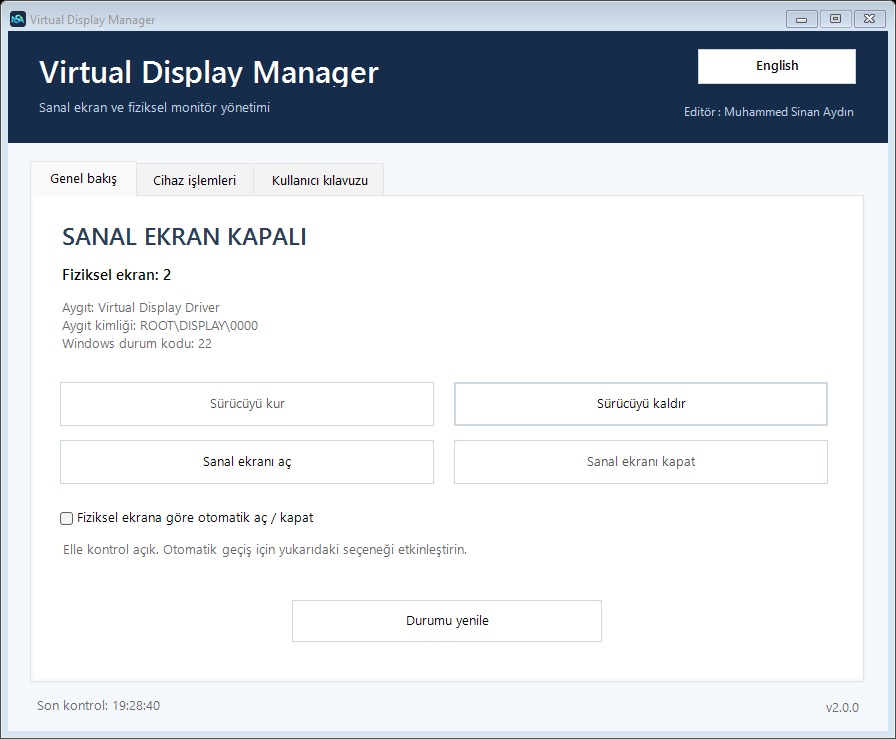
While the manager runs, an installed, disabled VDD is enabled when no physical display is active.
The virtual display is disabled when at least one active physical monitor is detected.
Two consistent samples confirm a change. Uncertain detection preserves the current state.
This utility does not establish remote connections or fix network, password or session issues. It addresses the display-source problem; not every black screen is caused by a missing monitor.
WHO IT IS FOR
Manage a virtual screen for desktop access through suitable remote-control software without keeping a monitor attached.
Use a virtual display configured and running in advance when nobody is available to attach a monitor.
Provide a screen for software that supports virtual-monitor capture. GPU routing and capture-display selection may need separate setup.
ONE PLACE TO MANAGE IT
Turkish/English UI, manual switching, an in-app guide and local activity history. Closing the window keeps monitoring in the notification area.
Right-click the tray icon and choose Exit application to stop it completely. This version does not register Windows autostart; launch it once per session.
DOWNLOAD AND LAUNCH
The ready-to-run CMD includes the application and offline installation components. If VDD is not installed, choose Install driver in the app. No separate PS1 file is needed.
Windows 10/11 x64 · Windows PowerShell 5.1 · .NET Framework · Administrator permission
Free download · v2.0.2 public preview · Source and licensing information on GitHub
FAQ
In suitable Windows, driver and remote-capture configurations, a software virtual monitor can serve the same display-source need. Compatibility with every setup is not guaranteed.
It depends on capture support and software version. Application-specific compatibility has not been tested for this project. Some tools already provide their own virtual-monitor support.
Yes. An internal panel reported as an active physical display counts. Automatic mode disables VDD while it is active.
No. The close button hides the window to the notification area. Use the tray menu’s Exit application action to stop monitoring.
This is a public preview. UI, simulated switching, icon, startup and read-only hardware checks passed. Actual cable changes and driver installation/removal were not tested in this release preparation. Verify it on a test device first.
Manually disabling VDD without a physical display may remove the remote picture. Keep an alternative access method when testing device changes.
GUIDES
Separate display-capture problems from network and session issues.
Understand the hardware and software approaches before choosing.